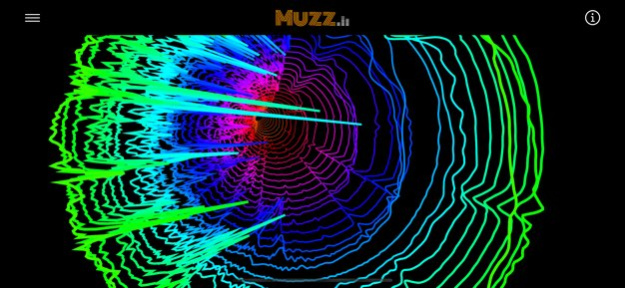
About Muzz - Audio Spectrum Analyzer
Muzz is a professional-grade real-time spectrum analyzer built for audio technicians, acoustic engineers, musicians, and sound enthusiasts. Whether you're diagnosing room acoustics, analyzing live microphone input,...
Muzz is a professional-grade real-time spectrum analyzer built for audio technicians, acoustic engineers, musicians, and sound enthusiasts. Whether you're diagnosing room acoustics, analyzing live microphone input, inspecting harmonics and feedback, or studying the frequency characteristics of any audio signal - Muzz gives you the tools to see exactly what you're hearing. 21 spectrum graph types, from standard linear analyzers to advanced harmonic alignment and octave-aligned displays, give you flexibility no single visualization tool can match. NEW IN 1.0.8 - Live frequency axis: Hz markers (100-8kHz) displayed permanently along the bottom of every visualization - Long press anywhere on the visualization to pin the exact frequency at that point for 2 seconds - Continuous background audio: Muzz now keeps analyzing when your screen locks or you switch apps - critical for live monitoring sessions - CarPlay compatible: enabling the microphone no longer interrupts audio playing through your car system - Frequency labels adapt automatically to dark and light mode Core Features - Load any audio file and visualize its full spectrum in real time - Live analysis mode via device microphone - ideal for room acoustics, stage monitoring, and field work - Persistent Hz frequency axis on every visualization - Long press to inspect exact frequencies at any point on the spectrum - Peak enhancer: isolates spectral lines (harmonics, fundamentals) and suppresses percussive noise - Toggle visualization variants to explore alternative display modes - Gain and treble controls to calibrate the display to your signal level - Dark and light mode with automatic label color adaptation - Runs continuously in the background - no interruptions during live sessions 21 Spectrum Graph Types Bars Extended Bars Short Line Spectrum Music Spectrum Linear OAS Overlapped Octaves Octave Aligned Spectrum Elliptical OAS Spiral OAS Harmonic Alignment TriOct Spectrum Overlapped Harmonics Harmonograph Cymbal Rainbow Spectrum Waterfall Rainbow OAS Rainbow Ellipse Spinning Ellipse Out of the Rabbit Hole Down the Rabbit Hole For in-depth theory on each spectrum type, tap the info icon to access the full Visualizations Guide. Questions, bug reports, or feature ideas - we want to hear from you: amitnadir@gmail.com
Version History Version 1.0.8 Live frequency display A frequency axis (100 Hz – 8 kHz) now appears along the bottom of every visualization. Long press anywhere on the screen (iOS) or click anywhere on the window (Mac) to see the exact frequency at that point - displayed for 2 seconds, then fades. Toggle the axis labels on or off from the side menu. Background audio fixed (iOS) Muzz now keeps running when your screen locks or you switch to another app. The audio engine also automatically recovers after phone calls, Siri interruptions, or headphone changes. CarPlay compatibility fixed Enabling the microphone no longer pauses CarPlay audio. Music playing through your car now continues uninterrupted while Muzz analyzes the live sound. Frequency label colors Labels adapt to dark and light mode - white on dark backgrounds, black on light. 1.0.8 Apr 29 Fixing bugs for better user experience 1.0.6 12/13/2022 improved performance and new interface for iPad. 1.0.5 11/20/2022 Improved app stability. 1.0.4 11/17/2022 Added support for iPhone devices with brand new shiny design. Fixed iPad bugs to get better app stability. Enjoy! 1.0.3 11/15/2022 Improved performance 1.0.2 10/25/2022 1.0 10/19/2022
Previous Versions
Here you can find the changelog of Muzz - Audio Spectrum Analyzer since it was posted on our website on 2024-04-02 15:14:57.
The latest version is 1.0.8 and it was updated on 2026-10-07 02:52:19. See below the changes in each version.
Muzz - Audio Spectrum Analyzer version 1.0.8
Updated At: 2026-10-07
Changes: Version History Version 1.0.8
Live frequency display
A frequency axis (100 Hz – 8 kHz) now appears along the bottom of every visualization. Long press anywhere on the screen (iOS) or click anywhere on the window (Mac) to see the exact frequency at that point - displayed for 2 seconds, then fades. Toggle the axis labels on or off from the side menu.
Background audio fixed (iOS)
Muzz now keeps running when your screen locks or you switch to another app. The audio engine also automatically recovers after phone calls, Siri interruptions, or headphone changes.
CarPlay compatibility fixed
Enabling the microphone no longer pauses CarPlay audio. Music playing through your car now continues uninterrupted while Muzz analyzes the live sound.
Frequency label colors
Labels adapt to dark and light mode - white on dark backgrounds, black on light. 1.0.8 Apr 29 Fixing bugs for better user experience 1.0.6 12/13/2022 improved performance and new interface for iPad. 1.0.5 11/20/2022 Improved app stability. 1.0.4 11/17/2022 Added support for iPhone devices with brand new shiny design.
Fixed iPad bugs to get better app stability.
Enjoy! 1.0.3 11/15/2022 Improved performance 1.0.2 10/25/2022 1.0 10/19/2022
Muzz - Audio Spectrum Analyzer version 1.0.4
Updated At: 2022-12-13
Changes: Dec 13, 2022
Version 1.0.4
Fixing bug for better user experience.
Muzz - Audio Spectrum Analyzer version 1.0.6
Updated At: 2022-12-13
Changes: Fixing bugs for better user experience
Disclaimer
Official App Store Link
We do not host Muzz - Audio Spectrum Analyzer on our servers. We did not scan it for viruses, adware, spyware or other type of malware. This app is hosted by Apple and passed their terms and conditions to be listed there. We recommend caution when installing it.
The App Store link for Muzz - Audio Spectrum Analyzer is provided to you by apps112.com without any warranties, representations or guarantees of any kind, so access it at your own risk.
If you have questions regarding this particular app contact the publisher directly. For questions about the functionalities of apps112.com contact us.